 KUMAKIKAI
Balance Calendar
iPhone
Record income and expenses as they happen. Look back at your daily finances in a calendar.

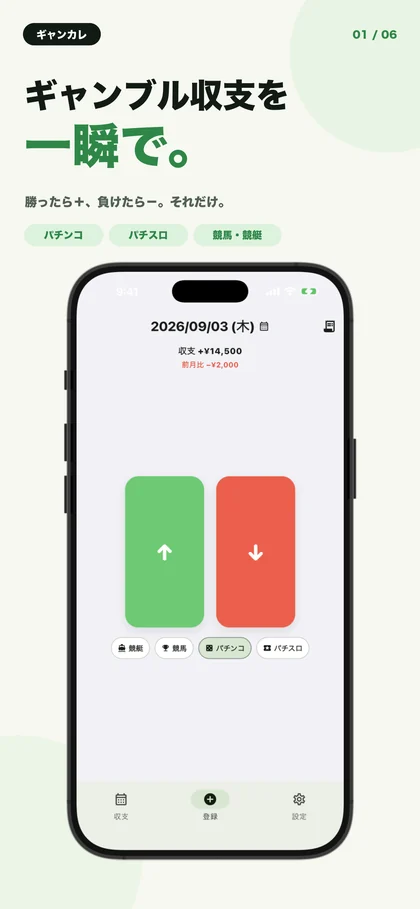
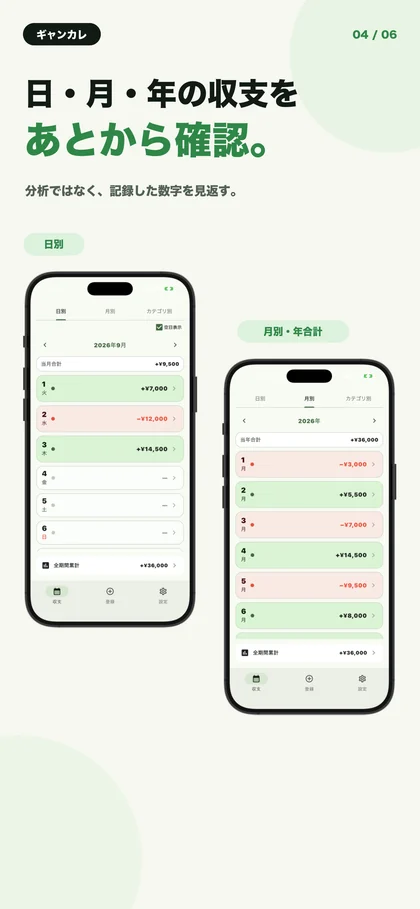
Screenshots show the Japanese version.
Record an amount now. Look back by date.
Balance Calendar is a simple way to record positive and negative amounts. Whether a day ends in a gain or a loss, keep the date and amount together so you can check them later.
Review your entries by day, month, and yearly total. Use tags to separate activities such as gambling, or rename them for everyday spending and savings records.
Key features
Choose income or expense
Choose the direction of the entry and enter an amount on a simple screen. You can also select the date.
See daily, monthly, and yearly totals
Switch between dated entries, monthly balances, and a yearly total to review the figures you recorded.
Separate activities with tags
Use tags to distinguish activities such as different kinds of gambling. Change tag names and icons to fit your use.
Open entry from a widget
The Home Screen widget’s up and down arrow buttons open the app’s income and expense entry screens, ready for an amount.
Two large buttons to start a record
Choose income or expense, then enter an amount. The recording screen shows the date and selected tag as you log the balance.
From a day’s entries to monthly and yearly totals
The history screens show dated records and monthly or yearly totals. Follow the dates to review the amounts you have entered.
When it is useful
Keeping a gambling record
Record gains and losses from your activities with a date and tag.
Noting spending or savings
Keep the amounts you need as positive and negative entries without maintaining a detailed household budget.
Reviewing a month
Check recorded daily figures and monthly totals instead of adding them up from memory.
Compatibility and essentials
- Devices
- iPhone
- Operating system
- iOS 14.0 or later
- Availability
- Available · App Store
- Totals use amounts you enter manually. The app does not automatically import bank or payment-service transactions.
- Records are stored on your device. Entering an amount from the widget opens the app’s entry screen.
See the App Store for pricing and in-app purchase details.
Find Balance Calendar on the App Store
Check compatibility and the latest app information.
Support
Guides and support
Find guides and answers to common questions. For further help, include the app name, your device, and what happened in your message.