 KUMAKIKAI
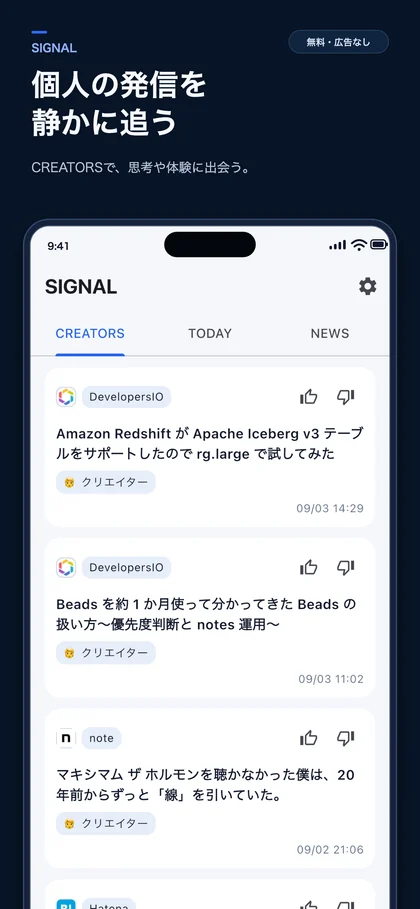
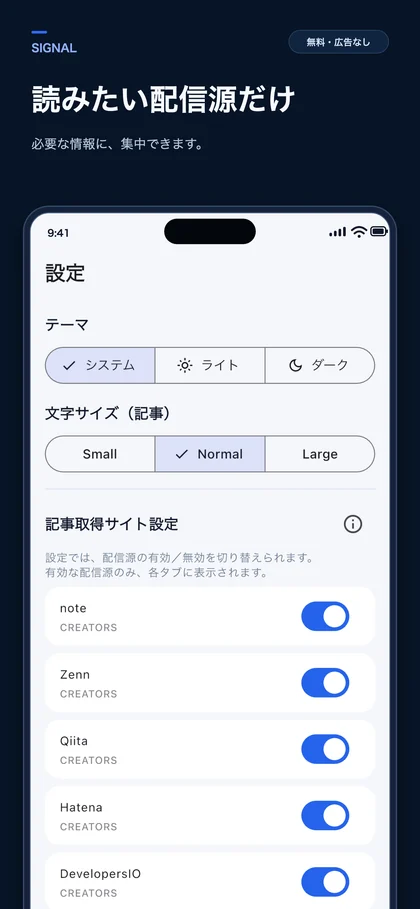
Screenshots show the Japanese version.
Creator posts and current topics, in one place.
SIGNAL brings together articles from sources such as note, Qiita, and Zenn, with a focus on individual writers and creators. Browse headlines and their sources without visiting each site separately.
Switch between CREATORS for creator posts, TODAY for a mix of topics, and NEWS for news coverage. Open a headline to read the original page inside the app.
Key features
A feed of individual voices
Browse articles from the built-in selection of sources, including note, Qiita, Zenn, Hatena Bookmark, and DevelopersIO.
Choose your sources
Turn each built-in source on or off in Settings to choose what appears in your feed.
Read the original article
Open an article from its headline. Adjust article text size and choose a light, dark, or system theme.
A feed shaped by your responses
Reading activity and GOOD/BAD feedback influence the order when the feed refreshes. Learning data stays on your device.
Discover a different perspective
CREATORS gathers posts from individual writers and creators. Scan headlines and sources, then choose an article that interests you.
Set the scope of your reading
Manage source switches in one settings screen, alongside the theme and article text size that suit how you read.
When SIGNAL fits
Catching up on technical writing
Check posts from sources such as Qiita and Zenn without moving between their sites.
Looking for individual perspectives
Find articles about a writer’s ideas and experiences alongside the news.
Reading on your own schedule
Open the feed when you have time and start with a headline that interests you.
Compatibility and essentials
- Devices
- iPhone
- Operating system
- iOS 13.0 or later
- Availability
- Available · App Store
- An internet connection is needed to fetch new articles and load article pages.
- Source selection is limited to the sources built into the app. The app interface is currently in Japanese.
See the App Store for pricing and in-app purchase details.
Find SIGNAL on the App Store
Check compatibility and the latest app information.

Support
Guides and support
Find guides and answers to common questions. For further help, include the app name, your device, and what happened in your message.