 KUMAKIKAI
GigaPoke
iPhone
Your data rewards.Use them before they expire.
Keep povo 2.0 reward codes in order of expiry. Copy the code you need and check your next data reward right from a widget.

An unofficial app for managing povo 2.0 rewards. It is not affiliated with, sponsored by, endorsed by, or otherwise associated with KDDI Corporation, povo, or au.
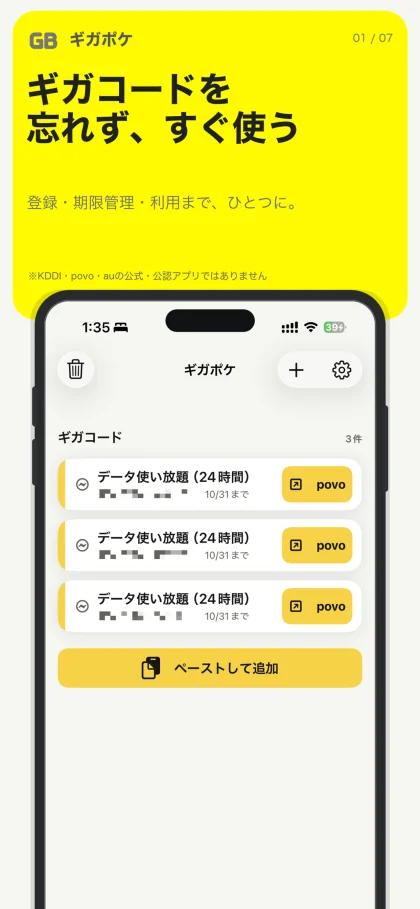
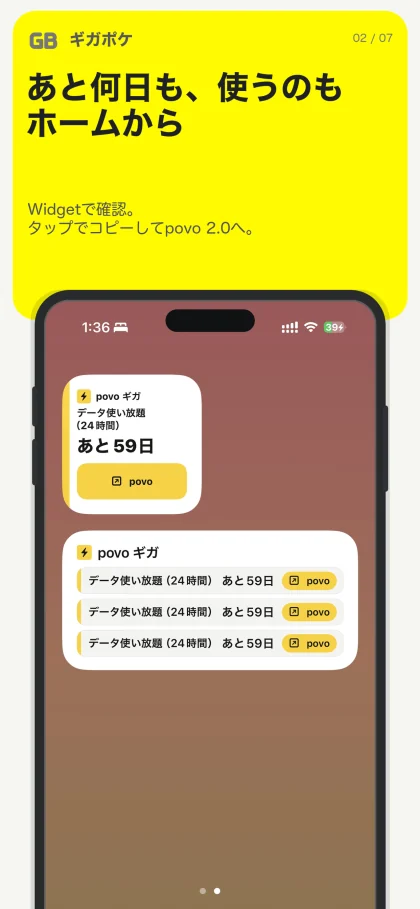
Screenshots show the Japanese version.
From a received code to using it.
Keep registered codes and deadlines together instead of searching your povo 2.0 reward emails again. Alongside data codes, you can organize external coupon codes and reward URLs.
Share from an email, save the details, choose a code nearing its deadline and copy it to use. GigaPoke is an unofficial iPhone app built around this sequence.
Key features
Register from an email
Share or paste the text containing the reward name, code and deadline. Review the extracted details before saving, or enter them manually.
Choose by expiry date
Rewards nearing expiry appear first within each category. Set advance notifications to help you decide when to use them.
Copy, then open povo 2.0
An optional setting opens the povo 2.0 app after copying a code. Pasting and redemption take place in povo 2.0.
Check a Home Screen widget
View a data code’s reward and remaining days on your Home Screen, then continue to the action for copying it.
Codes and deadlines in one list
The app’s home screen brings reward details and deadlines together, with actions to paste new entries and use a selected code.
Keep the next data code on your Home Screen
Small and medium widgets show data codes nearing expiry. A button opens GigaPoke so you can copy the code.
Ways to use GigaPoke
Organize reward emails
Save the codes and deadlines you need instead of finding the original email each time.
Use the soonest-expiring reward
When you have several data codes or external rewards, choose the next one by its deadline.
Check from the Home Screen
See reward details and remaining days in a widget before opening the app.
Compatibility and essentials
- Devices
- iPhone
- Operating system
- iOS 17.0 or later
- Availability
- Available · App Store
- Reward data is managed on the device. The app does not fill codes into povo 2.0 automatically or verify redemption.
See the App Store for pricing and in-app purchase details.
Find GigaPoke on the App Store
Check compatibility and the latest app information.
Support
Guides and support
Find guides and answers to common questions. For further help, include the app name, your device, and what happened in your message.