 KUMAKIKAI
Smokeless
iPhone / Apple Watch
Log when you smoke or resist a craving with a tap. See changes in your cigarette count and spending.
Log smoked or avoided cigarettes from Apple Watch, included with a Remove Ads or Extra Brands Pack purchase.

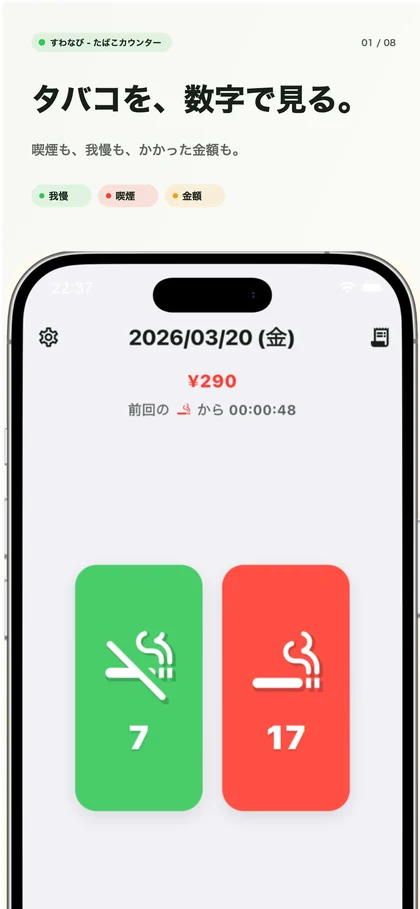
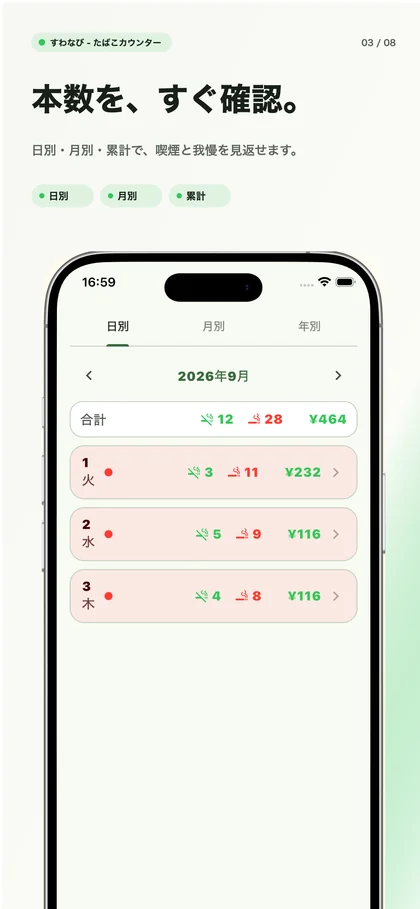
Screenshots show the Japanese version.
Record both cigarettes smoked and urges resisted.
Smokeless is a counter for two kinds of moments: when you smoke and when you want to smoke but do not. Log either with a tap and look back at what you recorded.
Use it while working toward quitting, or simply to understand your current cigarette count and spending. Daily, monthly, and yearly history, plus recent charts, show how your records change over time.
Key features
Two kinds of records
Use separate buttons for cigarettes smoked and urges resisted. You can keep a record of both.
Review different periods
Browse daily, monthly, and yearly history. Charts for a week, a month, or three months show recent changes.
Turn counts into cost estimates
The price and cigarette count you enter for a pack are used to estimate spending and the amount not spent when you resist.
Record from your Home Screen
Use the widget to log smoking or a resisted urge and check today’s counts.
Apple Watch
Record with one tap on Apple Watch.
Log a smoked or avoided cigarette without taking out your iPhone. Tap the green button on the left for an avoided cigarette, or the red button on the right for a smoked one.
The numbers show today’s counts. Review history and charts on your iPhone.
Records stay on your Watch while your iPhone is disconnected and sync after reconnecting. Purchase access must first be confirmed through the iPhone app.
Apple Watch recording is included with a Remove Ads or Extra Brands Pack purchase. Purchase or restore access in the iPhone app.
Requires Apple Watch with watchOS 9 or later and a compatible paired iPhone. Install the supporting update on both devices.
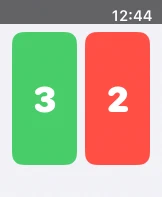
Two buttons for the moment at hand
Log smoking and resisted urges separately on the recording screen. Keep track as it happens and see today’s counts and cost estimates.
See your records side by side
History shows both smoking and resisted urges. Switch between daily, monthly, and yearly views to look back beyond a single day.
Who it is for
Understanding your current habits
See how much you smoke from your records instead of relying on memory.
Keeping track of resisted urges
Record the moments when you did not smoke and review your own actions.
Keeping an eye on spending
Use recorded counts and your pack settings to see an estimate of everyday cigarette spending.
Compatibility and essentials
- Devices
- iPhone / Apple Watch
- Operating system
- iOS 14.0 or later / watchOS 9.0 or later
- Availability
- Available · App Store
- Monetary amounts are estimates based on your pack price, pack size, and recorded counts.
- Smoking records, resisted urges, and settings are stored on your device.
- The iOS requirement above applies to the iPhone app. The Apple Watch app requires a paired iPhone running an iOS version compatible with the Watch.
See the App Store for pricing and in-app purchase details.
Find Smokeless on the App Store
Check compatibility and the latest app information.
Support
Guides and support
Find guides and answers to common questions. For further help, include the app name, your device, and what happened in your message.