 KUMAKIKAI
Introduction
Use the green button to record an avoided cigarette and the red button to record a smoked cigarette. These screens show where to log, review and change settings.
Requires an iPhone with iOS 14 or later.
Basic use
Check the first tutorial and pack settings
After the first tutorial, enter Cigarettes per pack and Price per pack. These values are used for money conversions. You can change them later in Settings → General → Brands.
Record from Log
- Open Log in the center.
- Tap the green crossed-out cigarette when you wanted to smoke but did not.
- Tap the red cigarette when you smoked.

Each tap adds one record. If you use several brands, select the brand before recording.
Review today’s records in History
- Tap the receipt-shaped icon at the top right of Log.
- Swipe an unwanted record to the left to delete it.
- Tap Undo immediately after deletion if needed.

Review by day, month, and year in Calendar
- Open Calendar at the bottom left.
- Switch between Daily, Monthly and Yearly.
- Tap a date row to review that day’s records.

Check recent changes in Charts
Open Charts at the bottom right, then choose Week, Month or 3 Months. Use the arrows beside the displayed period to move through dates.

Use the home widget
Add the Smokeless widget to your iPhone Home Screen. Tap the green avoided or red smoked button to record for today.
To choose the brand used by the widget, open Settings → General → Brands and enable Set as widget default. The widget itself does not switch brands.
Adjust Settings
- Tap the gear at the top left of Log.
- Open General and select the setting to change.

Change pack count and price in Brands. One brand is available initially; the Extra brands pack unlocks up to four in total. Restore purchases from Settings → In-app purchases.
Record on Apple Watch
Apple Watch recording is included with a Remove Ads or Extra Brands Pack purchase. Purchase or restore access in the iPhone app.
Requires Apple Watch with watchOS 9 or later and a compatible paired iPhone. Install the supporting update on both devices.
Set up access
Install the supporting update on your iPhone and Apple Watch. Open Smokeless on iPhone to confirm your Remove Ads or Extra Brands Pack purchase, then open the Watch app. If it remains locked after a purchase, restore purchases in the iPhone app’s Settings.
Record one cigarette
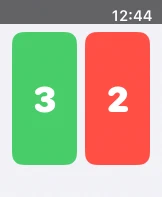
Tap green on the left when you wanted to smoke but did not, or red on the right when you smoked. The count increases immediately, without a confirmation screen.
Check today’s counts
Each button shows its count for today. Use Smokeless on iPhone to review past records and charts or to delete a record.
Sync with iPhone
After purchase access has first been confirmed, you can record while your iPhone is disconnected. Records are stored temporarily on your Watch and sync after reconnection. If a record has not appeared, check the connection and open both apps. Records retain the time you tapped on your Watch.
Help
For problems with operations or settings, see the checks in FAQ.
Contact
For help with Smokeless, use the contact option below.
Describe what you did and any message shown. Do not send passwords, verification codes, or personal text and images that are not needed to resolve the issue.